Showing posts with label Deployment. Show all posts

Saturday, August 3, 2013

WID Installation Failed - ADFS Configuration on Windows Server 2012

Hi,

During the configuration of ADFS 2.1 on Windows Server 2012, I recently faced a very weird error which itself doesn't describes anything relevant about what the exact problem is.
Error reads something as below:
An error occurred during an attempt to perform the configuration task: WID Installation failed
Below are the screenshot of ADFS configuration wizard where the error was faced.


Looking to the Event Viewer for the error logs, I found the error message which says "The Windows component "Windows-Internal-Database" was successfully installed." but in fact the ADFS configuration wizard failed at the very same step throwing the contradictory error message as above.

Searched a lot behind the cause of this specific error occurring during ADFS configuration but all in vain and then suddenly I came across this link which had similar error but faced for Windows server 2008 with ADFS 2.0.

You can refer to the solution in the above link or refer to the same solution below for your ready reference.

Solution:

Solution is very simple unlike the error message. Windows Internal Database was already installed on the machine and that was the reason AD FS configuration failed. You will have to uninstall Windows Internal Database and then again start AD FS configuration during which it will again install WID by itself.
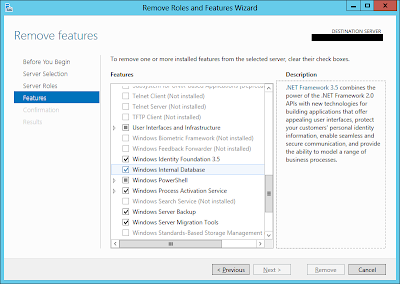
  • Go to Server Manager and at the right top menu bar panel, click on "Manage" -> "Remove Roles and Features"
  • In "Remove Roles and Feature" dialog box, go to "Features" menu and uncheck "Windows Internal Database" check box. (As shown in below screenshot)


  • Click on Next and complete the wizard.
  • Restart the server if it asks for after uninstall of WID.
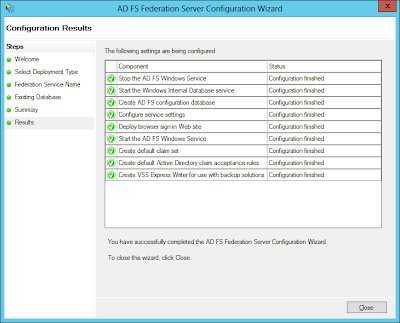
  • Restart AD FS Configuration wizard and complete the configuration. It will work like a charm as it did for me in the below screenshot.


P.S.: If you face an error again during AD FS configuration at the same WID step then you might need to move all LDF and MDF files of WID database on the path C:\Windows\WID\Data to some different folder just as a backup practice and then restart AD FS configration again and hopefully this time it should work flawlessly. Once your AD FS configuration is completed successfully then if you want you can delete those existing LDF and MDF files. 

Hope you find this post helpful to solve some issues related to AD FS and WID. 

Kindly provide your valuable comments or suggestion regarding this post.

Thank You !!! J

Monday, March 21, 2011

Steps to Add Deployment Administrator in MSCRM 4.0 from Database


Hello friends,

After a long busy schedule, today I want to share my one of the recent experience when I was caught in a problem which was arise by my small mistake J and then I managed to overcome to the solution.

Recently we needed import one of our CRM organizations from one deployment to other but due to some technical reasons the import got failed. Due to that failure before restarting import again, I needed to remove all the false entries which got created in MSCRM_CONFIG database during the failed import action. Within few minutes I managed to remove all the referential entries from all the tables related to the failed to import organization. 

But later on when I opened Deployment Manager, it did not allowed me to open it and responded me with below error
“Only the administrators are able to use deployment manager. you are not a deployment administrator.”
and later on I found that during the deletion of the false entries, by mistake all the entries related to deployment managers also got deleted.

After searching for couple of hours I managed to add Deployment Administrator from database and I want to share you the steps I followed to achieve the same.

Step 1: Get "systemuserid" for the user whom you want as a "Deployment Administrator" from CRM Database
Query: 
select systemuserid,fullname from systemuser where fullname like '%prathmesh%'

Step 2: Open SQL Server Management Studio and fire below query against MSCRM_CONFIG database
Query: 
SELECT Id, UserId
FROM SystemUserOrganizations
WHERE CrmUserId = <<systemuserid>> --Replace <> by the systemuserid got from step 1

Step 3: Fire Below query to get Administrator Security Role Id
Query:
SELECT Id FROM SecurityRole WHERE name = 'Administrator'

Step 4: Fire below query to Insert a record in SystemUserRoles table of MSCRM_CONFIG database
Query:
INSERT INTO SystemUserRoles
(
     [Id]
     ,[SecurityRoleId]
     ,[SystemUserId]
     ,[IsDeleted]
)
VALUES
(
     NEWID(), -- new Guid
     ,<<SecurityRoleId>>  --Replace "Id" Guid found from Step 3
     ,<<UserId>> --replace "UserId" Guid found from step 2
     ,0
)

Step 5: Add Name to SystemUser table using below query
Query:
UPDATE SystemUser
SET name =  <<mydomain\username>>  -- User's domain name\username
WHERE Id = <<UserId>>  -- Replace "UserId" Guid found from step 2


Hope this post helps you jump out of a situation in which I was caught… J

Feel free to post the query in case you need help for Dynamics CRM and this post.

Monday, November 29, 2010

ExecuteNonQuery requires the command to have a transaction when the connection assigned to the command is in a pending local transaction. The Transaction property of the command has not been initialized.

Hi..

Recently I came across one wierd Error found by one of my QA friend after we imported a new CRM 4.0 organization into our development environment. The error stated something like below (Error can be tracked in the trace log files. Check out this link to find out how to enable Tracing in CRM 4.0)

"System.InvalidOperationException: ExecuteNonQuery requires the command to have a transaction when the connection assigned to the command is in a pending local transaction. The Transaction property of the command has not been initialized."


We were facing this error on all the ISV aspx pages embedded into CRM and that too was user specific i.e. for some users these ISV pages worked fine but others were facing the above error.

After loads of digging and googling around the web, i came across this link which provided the solution but this was not the case for our error.

Solution : 
       The Solution was really very simple after we found it... The issue which we were facing was due to missing Default Organization for some of the users. We just updated the Default Organization for those users and the system go up and running.

Database: MSCRM_CONFIG
Table : Organization
Query : Select Id, UniqueName From Organization
              Get the Id from the above query result (In case of Multi-Tenancy, take the id of the organization which you want as default for the particular user)


Database: MSCRM_CONFIG
Table : SystemUser
Query : Update SystemUser
              Set DefaultOrganizaionId = <>
              Where Id = <>

Updating the DefaultOrganizationIds for the users will fix the above error and you are good to go to your boss and boast of your achievement !!! J

Hope you find this solution useful. Feel free to post the query in case you need help for Dynamics CRM and this post. J